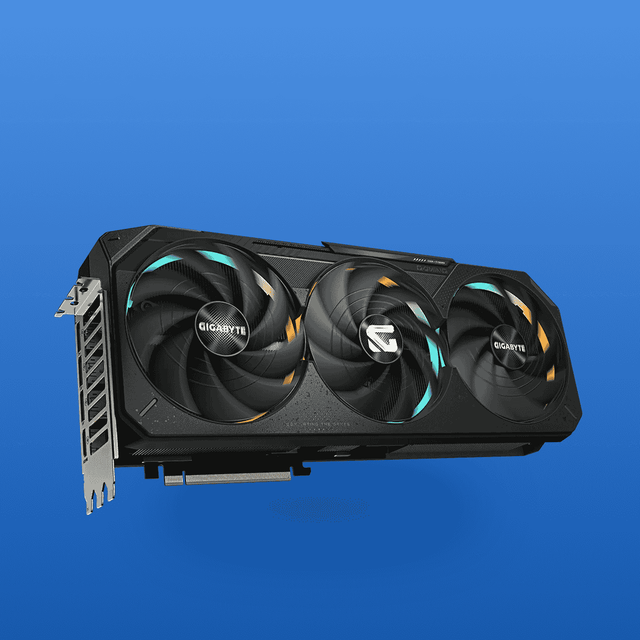
Graphic Engine
NVIDIA® GeForce RTX™ 5080
AI Performance
1899 TOPs
Bus Standard
PCI Express 5.0
OpenGL
OpenGL®4.6
Video Memory
16GB GDDR7
Engine Clock
OC mode: 2790 MHz
Default mode: 2760 MHz (Boost Clock)
CUDA Core
10752
Memory Speed
30 Gbps
Memory Interface
256-bit
Resolution
Digital Max Resolution 7680 x 4320
Interface
Yes x 2 (Native HDMI 2.1b)
Yes x 3 (Native DisplayPort 2.1b)
HDCP Support Yes (2.3)
Maximum Display Support
4
NVlink/ Crossfire Support
No
Accessories
1 x Speedsetup Manual
1 x ROG Graphics Card Holder
1 x ROG Velcro Hook & Loop
1 x ROG Magnet
1 x ROG Graphics Card Keycap
1 x ROG PCB Ruler
1 x Thank You Card
1 x Adapter Cable (1 to 3)
Software
ASUS GPU Tweak III & MuseTree & GeForce Game Ready Driver & Studio Driver:
please download all software from the support site.
Dimensions
357.6 x 149.3 x 76 mm
14.1 x 5.9 x 3 inch
Recommended PSU
850W
Power Connectors
1 x 16-pin
SPECIFICATION
Model
PRIME-RTX5080-O16G
Graphic Engine
NVIDIA® GeForce RTX™ 5080
AI Performance
1827 TOPs
Bus Standard
PCI Express 5.0
OpenGL
OpenGL®4.6
Video Memory
16GB GDDR7
Engine Clock
OC mode: 2685 MHz
Default mode: 2655 MHz (Boost Clock)
CUDA Core
10752
Memory Speed
30 Gbps
Memory Interface
256-bit
Resolution
Digital Max Resolution 7680 x 4320
Interface
Yes x 1 (Native HDMI 2.1b)
Yes x 3 (Native DisplayPort 2.1b)
HDCP Support Yes (2.3)
Maximum Display Support
4
NVlink/ Crossfire Support
No
Accessories
1 x Speedsetup Manual
1 x ASUS Velcro Hook & Loop
1 x Thank You Card
1 x Adapter Cable (1 to 3)
Software
ASUS GPU Tweak III & MuseTree & GeForce Game Ready Driver & Studio Driver:
please download all software from the support site.
Dimensions
304 x 126 x 50 mm
12 x 5 x 2 inch
Recommended PSU
850W
Power Connectors
1 x 16-pin
Slot
2.5 Slot
SFF Ready
Compatible
Specifications
Graphic Engine:
NVIDIA® GeForce GTX 1650
Video Memory:
4GB GDDR6
Memory Interface:
128-bit
CUDA Cores:
896
Memory Speed:
12 Gbps
Boost Clock:
1665 MHz (OC Mode), 1635 MHz (Gaming Mode)
Bus Standard:
PCI Express 3.0
OpenGL:
OpenGL®4.6
Digital Max Resolution:
7680 x 4320
I/O Ports 1 x Native DVI-D, 1 x Native HDMI 2.0b, and 1 x Native DisplayPort 1.4.
Features
Compact Design:
Ideal for smaller PC builds.
Efficient Cooling:
Uses an Axial-tech fan design to increase downward air pressure.
Auto-Extreme Technology:
An automated manufacturing process that increases reliability and reduces environmental impact.
Software Support:
Includes ASUS GPU Tweak II for monitoring, tweaking, and tuning.
Power Connector:
Requires a single 6-pin power connector.
Specifications
Graphic Engine:
NVIDIA® GeForce RTX™ 4070 SUPER
Video Memory:
12GB GDDR6X
CUDA Cores:
7168
Bus Standard:
PCI Express 4.0
Memory Speed:
21 Gbps
Memory Interface:
192-bit
Digital Max Resolution:
7680 x 4320
Boost Clock (OC Mode):
2595 MHz
Key Features:
12GB GDDR6X Memory: Large memory capacity for high-resolution gaming, ensuring smooth performance even in demanding applications.
TUF Gaming Design: Built for durability and reliability, featuring a rugged aesthetic and enhanced thermal performance.
Factory Overclocked: Optimized clock speeds for superior graphics rendering and gameplay, giving you a competitive edge.
Advanced Cooling Technology: Features a multi-fan setup and effective cooling design to maintain low temperatures during intense gaming sessions.
Ray Tracing and DLSS Support: Experience stunning visuals and improved performance through real-time ray tracing and AI-driven graphics enhancements.
How to Use:
Installation: Open your PC case and locate the PCIe slot. Remove any existing GPU and securely install the Asus TUF-RTX4070S.
Power Connection: Connect the necessary PCIe power cables from your power supply to the graphics card.
Driver Installation: Download and install the latest drivers from the Asus website for optimal performance.
Configuration: Use gaming software to customize settings for the best experience tailored to your preferences.
specifications:
GPU Architecture:
NVIDIA Blackwell
Memory:
16GB GDDR7
Memory Interface:
128-bit
Memory Speed:
28 Gbps
Boost Clock:
2722 MHz
Interface:
PCIe 5.0
Max Resolution:
7680 x 4320 (8K)
Display Outputs:
3x DisplayPort 2.1b, 1x HDMI 2.1b
Cooling:
Gigabyte WINDFORCE cooling system with three fans
Additional Features:
Dual BIOS (Performance/Silent), RGB Halo lighting
DLSS:
Supports DLSS 4 with advanced features like Frame Warp
Key Features:
16GB GDDR7 Memory: Ample memory capacity for high-resolution gaming and multitasking, ensuring seamless performance in demanding applications.
AORUS Elite Design: Sleek and stylish aesthetics with customizable RGB lighting to enhance your gaming rig's overall look.
Efficient Cooling System: Advanced thermal management keeps temperatures low, providing stable performance even during long gaming sessions.
Factory Overclocked: Optimized clock speeds for superior graphics and enhanced gaming experiences.
Ray Tracing Support: Experience ultra-realistic graphics with real-time ray tracing capabilities, perfect for the latest gaming titles.
How to Use:
Installation: Open your PC case and locate the PCIe slot. Remove any existing GPU and securely install the Gigabyte GV-N506TAORUS E.
Power Connection: Connect the necessary PCIe power cables from your power supply to the graphics card.
Driver Installation: Download and install the latest drivers from the Gigabyte website to ensure optimal performance.
Configuration: Use your preferred gaming software or tools to adjust settings for the best experience tailored to your preferences.
Specifications
Model:
PRIME-RTX5080-O16G
Graphics Engine:
NVIDIA® GeForce RTX™ 5080
Video Memory:
16GB GDDR7
Memory Interface:
256-bit
Memory Speed:
30 Gbps
CUDA Cores:
10,752
Bus Standard:
PCI Express 5.0
Engine Clock (OC Mode):
2685 MHz
Engine Clock (Default/Boost Mode):
2655 MHz
Digital Max Resolution:
7680 x 4320
AI Performance:
1827 TOPs
Key Features:
16GB GDDR7 Memory: Ample memory for seamless multitasking and high-resolution graphics in demanding applications.
Factory Overclocked: Optimized for enhanced performance, delivering smooth gameplay and faster rendering.
Robust Design: Built with high-quality components for reliability and durability in various environments.
Advanced Cooling System: Efficient thermal management ensures optimal performance, even during extended gaming sessions.
Ray Tracing Support: Experience stunning visuals with real-time ray tracing and AI-enhanced graphics capabilities.
How to Use:
Installation: Open your PC case and locate the PCIe slot. Remove any existing GPU and securely install the Asus PRIME-RTX5080.
Power Connection: Connect the required PCIe power connectors from your power supply to the graphics card.
Driver Installation: Download and install the latest drivers from the Asus website for optimal performance.
Configuration: Use gaming or graphics software to adjust settings according to your preferences for the best experience.
Key Features:
16GB GDDR7 Memory:
High-speed memory designed for demanding games and applications, ensuring seamless performance.
Factory Overclocked:
Optimized clock speeds for enhanced graphics rendering and smoother frame rates.
ROG Design:
Premium build quality with a striking aesthetic, perfect for high-end gaming setups.
Efficient Cooling:
Advanced thermal management system keeps temperatures low, enhancing stability during intense gaming sessions.
Ray Tracing Support:
Enjoy realistic lighting and reflections for immersive visual experiences.
Specifications
Graphic Engine:
NVIDIA® GeForce RTX™ 4070 Ti
Video Memory:
12GB GDDR6X
CUDA Cores:
7680
Memory Speed:
21 Gbps
Memory Interface:
192-bit
Engine Clock:
OC Mode:
2760 MHz
Default Mode:
2730 MHz (Boost Clock)
Digital Max Resolution:
7680 x 4320
Bus Standard:
PCI Express 4.0
Unlock cutting-edge gaming performance with the Asus TUF-RTX4070TI-O12G-GAMING, featuring 12GB of GDDR6X memory and a robust design optimized for durability and efficiency.
Key Features:
12GB GDDR6X Memory: Delivers high-speed performance for the latest games and applications.
Factory Overclocked: Enhanced clock speeds for superior graphics performance and smoother gameplay.
TUF Components: Built with military-grade components for exceptional durability and reliability.
Advanced Cooling: Equipped with a powerful cooling system to maintain optimal temperatures during intense gaming sessions.
Multiple Outputs: Features HDMI and DisplayPort connections for versatile display options.
How to Use:
Installation: Open your PC case and locate the PCIe slot. Remove any existing GPU and securely insert the Asus TUF-RTX4070TI.
Power Connection: Connect the necessary PCIe power cables from your power supply to the graphics card.
Driver Installation: Download and install the latest drivers from the Asus website to ensure optimal performance.
Configuration: Use gaming software to fine-tune settings for an enhanced experience tailored to your preferences.
Specifications
Graphics Processing:
GeForce RTX™ 5070 Ti
Core Clock:
2542 MHz (Reference: 2452 MHz)
CUDA® Cores:
8960
Memory Clock:
28 Gbps
Memory Size:
16GB
Memory Type:
GDDR7
Memory Bus:
256 bit
Card Bus:
PCI-E 5.0
Digital Max Resolution:
7680 x 4320
Card Size:
L=304 W=126 H=50 mm
PCB Form:
ATX
Recommended PSU:
750W
Power Connectors:
1x 12V-2x6
Output:
3x DisplayPort 2.1b, 1x HDMI 2.1b
Key Features:
16GB GDDR7 Memory: Provides ample memory for high-resolution gaming and demanding applications.
Factory Overclocked: Optimized for maximum performance, delivering smooth gameplay and faster rendering.
Eagle Cooling Design: Advanced cooling technology ensures optimal thermal performance and quieter operation.
Compact Form Factor: Specifically designed to fit in smaller builds without sacrificing power or performance.
Ray Tracing Support: Enjoy stunning visuals with real-time ray tracing capabilities for immersive gaming experiences.
How to Use:
Installation: Open your case and locate the PCIe slot. Remove any existing GPU and insert the Gigabyte GV-N507TEAGLE securely.
Power Connection: Attach the required PCIe power connectors from your power supply to the graphics card.
Driver Installation: Download the latest drivers from the Gigabyte website for optimal performance.
Configuration: Use your favorite software to adjust settings for gaming or productivity tasks as needed.